Category Archives: Computers and Internet

Posts on computer science and the web, rants about OS:es, Window Managers, Platforms for almost publishing content on the web, and the like.

watch – Linux command

The Linux watch command is a nifty little tool that can be used when you want to keep the result of a command under constant watch.

Here’s a sample for watching the /proc/mdstat file.

watch -n1 cat /proc/mdstat

The “-n1“-switch tells watch to refresh every “1” second (“-n2” would consequently mean, “refresh every 2 seconds” and so on).

The “cat /proc/mdstat” is the command to keep an eye on. “/proc/mdstat” is a process file that displays the state of md-raid drives in the system.

Press ctrl-C” to stop the running command.

This is an example of “watching” the free memory:

watch -n1 free -m

If you add the “-d” switch, watch will mark differences between the runs.

watch -d -n1 free -m

And with the “-d=cumulative” switch the differences will be marked cumulatively between runs:

watch -d=cumulative -n1 free -m

You may also watch for directory changes:

watch -d ls -l

If you do not specify a watch interval (using “-n“) the default is set to 2 seconds.

For more info, see the manual pages for the watch command.

For watching files see the related “tail” command.


PEBCAK and other ways to blame the user…

User ErrorIn IT-support jargon the expression “PEBCAK” (meaning “Problem Exists Between Chair and Keyboard”) is used to blame the user of the system for any computer-related problems they are experiencing while using said system – since they are located “between the chair and the keyboard” in most usual situations…

PEBCAK can be found long before the program reaches the end-user

I had a fun thought about the expression PEBCAK. Given my many years in IT development, I have observed two things:

  1. Few programmers write their programs without sitting on a chair in front of a keyboard…
  2. PEBCAK is just as likely to start way before the software reaches the end-user.

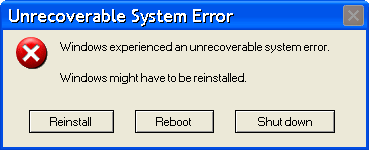
Unrecoverable System ErrorIf you think the Project Cartoon is a gross exaggeration (you are probably an ordinary, unsuspecting computer user, and a victim :P…) I have to inform you, it’s not… The sad truth is that programmers have never been in control of systems, and even the most stable and dependable systems have flaws.

Even NASA has PEBCAK

Did you know that up until 2007 the space shuttles never flew missions over the new year… why? Because their computer systems, programmed in the 70ies, had no stable support for year changes…

Searching to find my source on the above statement only produces two Slashdot articles with links to, now non-existing, articles on CNN and Reuters. (Although I just came across this fact a couple of months ago, so either the conspiracy is recent, or my Googling skills are decreasing…) Anyway, here’s the Slashdot links:

I’m not going to search for pacemaker system errors or similar, but I can guess the mitigating circumstances are that you’re not in space when the problem occurs and might actually get into the hospital in time…

If you like to read more about programmer initiated system errors (and errors initiated by IT projects) you should check out The Daily WTF.

ISO 8601, or not…

They always have great alt texts as well: ISO 8601 was published on 06/05/88 and most recently amended on 12/01/04.
XKCD – nerd humor at its best!

I think Sweden adopted ISO 8601 sometime around when it came. Before that we would write dates as day/month-year (that would be discouraged format number 11 on the image to  the right).

Then came along Internet Information Server (IIS) invented by an American firm you might now, called Microsoft. In the US where Microsoft lives, dates are written using discouraged format number 1, or perhaps 2, unless it’s 3 or 4, I never manage to keep track.

Most of the time it’s possible to just ignore the highly illogical way of mixing up days and months and years in the US way of writing things. ISO 8601 goes from larger to smaller, the old Swedish way went from smaller to larger, the US way goes from uh… large to smallest, to largest…

However, a project I was involved in a couple of months ago used some form of standard date widget in IIS (Internet Information Server, Microsoft’s Web Server) that used discouraged format number 1 above.

Now for the fun part. In my humble and naïve mind this should be a question of just setting a language setting somewhere in the web server to get it right. Apparently it wasn’t (!?) Instead everyone was running with the totally confusing US-dates. The budget did not have room for making the change, and it seemed everyone humbly adopted… after all, there was a “date browser” that could be opened pressing a button (first time it took a minute to open, but then it was business as usual). I’m guessing they used that function to get their dates, or perhaps I’m just an old fossil that doesn’t adopt well.

So the punchline (unless the previous sentence wasn’t punchline enough for you…): yeah standard until some guy comes along and wants it otherwise, and this guy has all the power… then it’s a (quote-unquote) “standard” and not a standard any more.


Ubuntu Satanic Edition

Ubuntu Satanic Edition, with hellfires...
Ubuntu Satanic Edition, By Daniel F. Pigatto

If you feel like your Ubuntu is way to benevolent, you can always go Satanic.

Of course, I thought this was the edition I had installed, given Unity’s behavior, and the fact that my raid-devices are dropping like flies (they passed a badblocks scan, and as far as I can tell they are working again), but alas, perhaps I need more goat blood, hell fires and ritual chants?

The versioning of Ubuntu SE is less time constrained. Instead of using the year and date, like Ubuntu does, the numbering is simple: 666.8, for instance is the version number of “Undead Legion”, followed by 666.9 “Microsoft Massacre”, and 666.10 “Necrophiliac Necromancer”.

On the plus side, I may be able to scare my computer into submission by burning a CD of satanic edition…

OK, seriously. I fear Ubuntu Satanic Edition may be way too old to do anything with… (um although upon closer examination, they seem to have a news item from 27th of uhh January, 2012… that’s a year ago…) but on the other hand… Isn’t the current edition way too satanic? I think I could get a break from all the unholy shit going on if I installed this one with goat heads, flames and blood and everything else that belongs!

Another way to go would be Ubuntu Christian Edition, but unfortunately, I do not think Jesus will be downloading it any time soon…

MS Outlook laughs at your feeble attempts to use it…

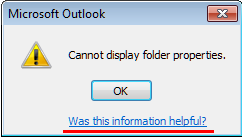
scornful-outlookNot only doesn’t it work, it laughs at you while you try using it… or well, it’s being scornful. I’m talking about Microsoft Outlook, that gave me the following comment (underlined red) when I tried to use it today.

So was the information helpful?… uh… I guess compared to faking that it can do the work and then tell me in about a week that sorry, I was just kidding, it is in fact helpful to get to know it cannot be done already on Monday…

Happy Monday!

Unity tip: Open more than one instance of a program

Clicking on a program icon on the Dash.

In Ubuntu 12.04 LTS, using Unity, if you have opened an instance of a program, clicking the application icon for that program again will only select the most recently displayed window of that program.

Clicking again displays all windows of that program in a scaled down version (á la OSX 2000 or similar).

However, in order to open a second instance of a program you have to mouse-wheel-click on the icon (I’m only guessing, but middle-button-mouse-click might also work, left-right-mouse-button click does not…)

Another way to do it is holding down the Window-key and Shift while pressing the number for the application you want to open another instance of. Holding down the Window-button alone shows the numbers (but the applications on the bar are numbered starting with 1, but excluding the “Dash home”).

Google translate is safe…

It seems Google Translate has little to fear from the competition. The site HowtoSayin.com poses the following question on one page:

How to say “hon wisperd säger ord i mitt öra att förbaskat nära made my toes curl” in…

The short answer: you certainly do not… at least not in Swedish, or English, who both seems to be parents of the above monster child of a sentence…

A full “translation” to English would be something along:

How to say “she whispered says word in my ear that damn near made my toes curl” in…

So, yes… Google Translate is still pretty safe in the translation business…

Backwards Firefox Update… Bad Firefox!

I just upgraded my Firefox and afterwards Firefox update as usual checked what plug-ins would be compatible or not…

Today Tab Mix Plus wasn’t compatible and Shazam! All my tabs are lost (or at least they are gone for now, I can only assume lost to never be found again…) Not that I really had my bookmarks collection there or anything like that, but still… the tabs represented “unfinished issues”.

So I just had this thought: why does Firefox upgrade first and then checks if the plug-ins will fail or not? Shouldn’t it be the other way around? Firefox update should first check what plug-ins won’t be compatible then ask the user if they want to hold back the upgrade, and if not, then make the upgrade?

This way I could have held back my upgrade until Tab Mix was compatible (which I am pretty sure will happen in hours or days…)

Update: I found a description on superuser.com that details how to perform the plug-in check before running Firefox update… so this becomes a “Bad Ubuntu” post instead… why doesn’t the Ubuntu upgrade perform this check before just forcing Firefox on me? Ah, well…

As it turns out, the option to check for updates as the post (from 2009) states isn’t even available in my Ubuntu installed Firefox. Unclear if it’s available in Firefoxes not controlled by an Ubuntu install (I’ll have to check on my work machine to determine that…) Or perhaps it’s that I have version 17 of Firefox… maybe the option only appears when there’s an update to have? – my Firefox is just updated, but still… my Ubuntu will probably not like it if I start upgrading Firefox on the side.

Update 2: Nope, once Tab Mix Plus was back in the game again, I did regain all my old tabs… and lost the new ones (ugh). Ah well… *shrug* And I didn’t seem to find any way to make blockhead-Ubuntu-update ask before shooting on this one either… At least the tabs are just “on vacation” for a while whenever this happens…

Time to put the IT-business out of its misery?

I just came across this article about the Apple-Samsung battle:

http://www.engadget.com/2012/08/10/apple-samsung-presentation-licensing/

I’ve decided software patents pisses me off… and if they are allowed to be honoured 100% as patent laws intends it… we could just put the IT-business out of its misery and go back to pen and paper (unless there’s a “writing” patent out there somewhere?) … or perhaps we should “call software patents as we see them” and put them out of their misery…?

This is what different (clueless and unfit?) patent clerks have decided to approve:

  • US 5566337 – owned by Apple, A.K.A. the Observerpattern. Kiss SWT, Swing and almost all other GUI frameworks goodbye – they use observation to handle events such as clicking a button.
    • “In a computer including an operating system, an event producer for generating an event and detecting that an event has occurred in the computer and an event consumer which need to be informed when events occur in the computer”
  • US 5969705 – also Apple – details how an operating system can be “multitasking”… filed 1997 and accepted 1999… I knew Windows 95 wasn’t multitasking, but HEY… there are other OS:es out there… like Linux… that was multitasking LONG before 1999…
    • “Method and apparatus for a first process operative in a computer system controlling a user interface on a computer system display under control of a second process operative in the computer system. An event handler is installed for the second process, the event handler servicing events generated for controlling the user interface display under control of the second process. The first process may then perform a first set of functions in the computer system. The first process generates events for controlling the user interface display, the events related to the functions performed by the first process. The event handler receives the events generated by the first process and updates the user interface on the computer system display according to the events generated by the first process and received by the event handler.”
    • Or I guess we could always handle multitasking by having one process doing all of  the above and then having another process jerking off while that happens… reminds me about the “Multi Agent Programming” course on UNI when we had to implement a Multi agent system for playing chess…
  • Or how about US 5911067 – “Application Switching”
    • “A method and apparatus for transferring control between application programs. A messaging means is provided which allows a first application program to indicate to the messaging means that a second application program should assume control. The messaging means receives the message and performs an orderly shutdown of the first application program and messages the second application program that it should commence operation. Upon valid and proper operation of the second application program, the first application program is caused to be suspended, and the second application program is invoked.”
    • An alternative would be to have one application that can run several “programs” like different Wordfiles… or wait… wouldn’t that be just like an operating system starting an…. Application… oh well.. who needs applications… and anyway… who needs to switch between them? Let’s play “Windows” again… it’s an application… right?

I’m certain many people that doesn’t know so much about computers or programming (like the patent (cl/j)erks who approved these patents) will find the whole discussion abstract and boring. Who cares about some bizarre event-something, or some applications-something… and besides, they were smart and they worked hard for their patents… you’re just being a jealous douche bag for not allowing them their well earned cash in…

In an attempt to strike home the preposterous nature of these patents, here are some examples of patents that will never be accepted, because they are as obviously not fit for patenting to the “common man” as most IT-patents are to IT professionals:

  • Waste product gathering and disposal mechanism:
    • A method for gathering waste products in home or industrial environments, and a process for disposing of them. Following these steps: 1) take a plastic bag, place it in a holder such as a waste bin, or just let it lay on the floor, or some other surface where the bag is readily accessible. 2) whenever there’s “waste” (different forms of materials in need of disposal such as wrappers, paper napkins, fruit peals, etc) put it in the bag. 3) once the bag is full (or in the case of perishable waste, at a set time interval such as “several times a week”) tie the open end of the bag and throw it out…. (“Trashcan” patent for detailing the “throwing out” pending…)
  • Garment renewal process:
    • A method for renewing used garments such as socks and shirts. Follow these steps. 1) Wear garments. 2) Throw garments in laundry basket. 3) when you run out of clean clothes, apply water and detergent + mechanical “swashing around” – rinse and dry… 4) voila – clothes are as good as new…

Now why can’t I have those patents, and why do I not deserve them?

Because they are obvious methods for solving trivial problems. Unfortunately for the IT-business the patents awarded for the same obvious methods for the same trivial problems are not obvious to the people awarding the patents. It seems comparing the IT business with the construction business won’t really be worth anything unless you have “digging patents” to be harassed by when you try to build a house…

Ah well… I want to write a bestseller anyway… perhaps I should do a “Grisham” and write about a patent breaking IT company that feeds their employees to the sharks in order to prevent exposing their evil deeds?